01. Headstart
Overview
The document demonstrate about the landscape of basic headstart for Python, started with constant, data types and structures.
Components
Python Execution Model
Here is the model of https://docs.python.org/3/reference/executionmodel.html#naming-and-binding
Constants
Following table that introduce the built-in constants supported
A small number of constants live in the built-in namespace. They are:
| Constant | Description |
|---|---|
False | The false value of the bool type |
True | The true value of the bool type |
None | An object frequently used to represent the absence of a value |
NotImplemented | Special value indicating that an operation is not implemented |
Ellipsis | an object frequently used to indicate that something is omitted. Aka of ... |
__debug__ | This constant is true if Python was not started with an -O option. |
Ellipsis | an object frequently used to indicate that something is omitted. Aka of ... |
Note:
. Assignments to False are illegal and raise a SyntaxError. . Assignments to True are illegal and raise a SyntaxError. . Assignments to None are illegal and raise a SyntaxError.
Assignment to Ellipsis is possible, but assignment to ... raises a SyntaxError. Ellipsis is the sole instance of the types.EllipsisType type.
Objects
Objects are Python"s abstraction for data. All data in a Python program is represented by objects or by relations between objects.
Data Types
Python has a rich set of built-in data types, which are illustrated in the diagram below.
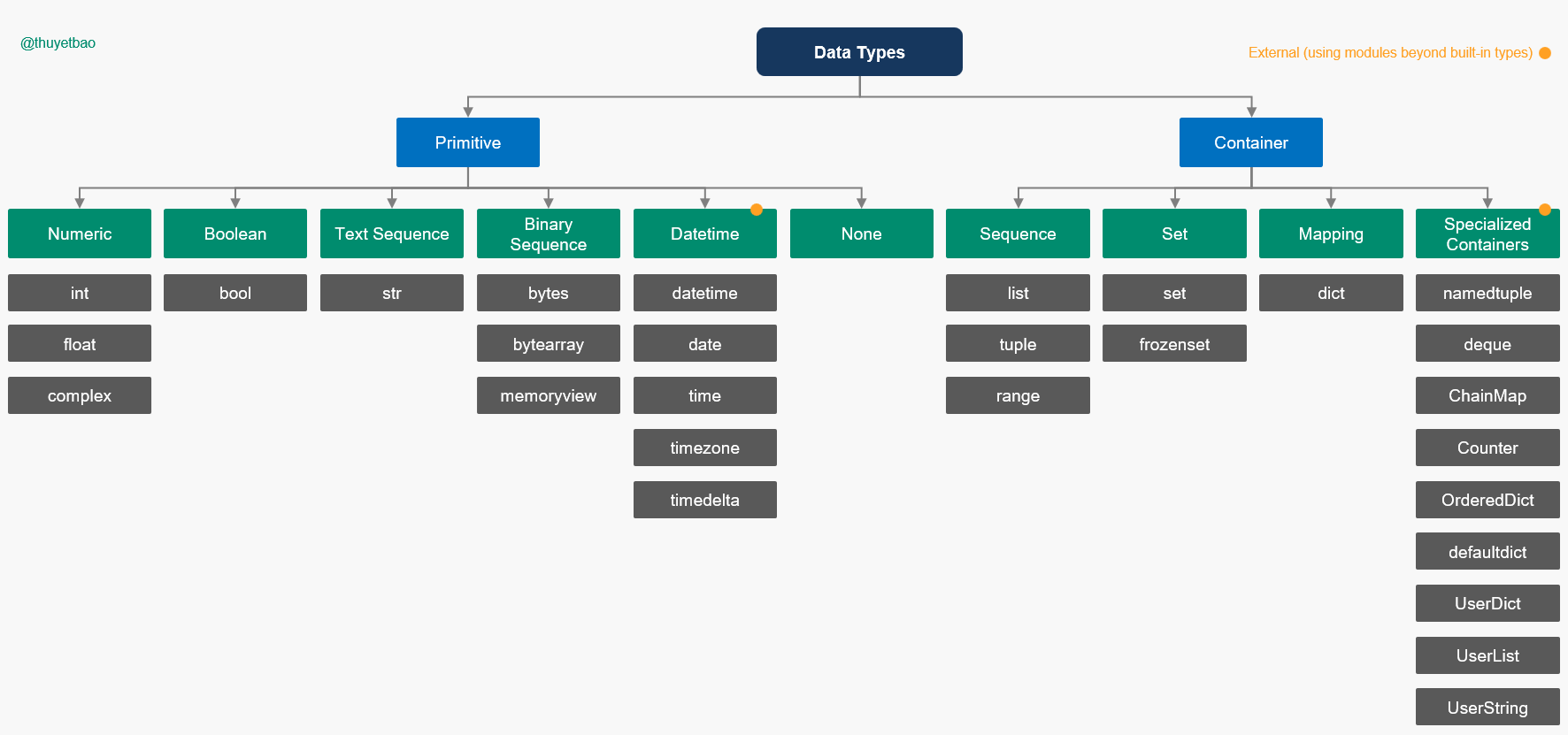
| Group | Type | Built-in (T|F) | Description |
|---|---|---|---|
| Numeric | int | True | |
float | True | ||
complex | True | ||
| Boolean | bool | True | |
| Text Sequence | str | True | |
| Binary Sequence | bytes | True | |
bytearray | True | ||
memoryview | True | ||
| Datetime | datetime | False, datetime | A combination of a date and a time |
date | False, datetime | A native date | |
time | False, datetime | An idealized time, independent of any particular day | |
timezone | False, datetime | A class that implements the tzinfo abstract base class as a fixed offset from the UTC | |
timedelta | False, datetime | A duration expressing the difference between two datetime or date, to microsecond resolution. | |
| None | None | True | |
| Sequence | list | True | |
tuple | True | ||
range | True | ||
| Set | set | True | |
frozen | True | ||
| Mapping | dict | True | |
| Containers | namedtuple | False, colectition | named tuple factory function for creating tuple subclasses with named fields |
deque | False, colectition | list-like container with fast appends and pops on either end | |
ChainMap | False, colectition | dict-like class for creating a single view of multiple mappings | |
Counter | False, colectition | dict subclass for counting hashable objects | |
OrderedDict | False, colectition | dict subclass that remembers the order entries were added | |
defaultdict | False, colectition | dict subclass that calls a factory function to supply missing values | |
UserDict | False, colectition | wrapper around dictionary objects for easier dict subclassing | |
UserList | False, colectition | wrapper around list objects for easier list subclassing | |
UserString | False, colectition | wrapper around string objects for easier string subclassing |
Python provides a set of primitive data-types that do not rely on any other modules. |These include the numeric types, sequences, mappings, sets, and frozensets, as well as the None type and boolean types.
2.2 Core Native Data Types . . . . . . . . . . . . . . . . . . . . . . . . . . . . . . . . . . . . . 16 2.3 Additional Container Data Types in the Standard Library . . . . . . . . . . . . . . . . . . . 24
A mutable object is an object which can be modified after it is created. Examples of mutable objects are lists, dictionaries, and sets. These objects can have their contents changed after they are created.
An immutable object is an object which cannot be modified after it is created. Examples of immutable objects are integers, strings, and tuples. These objects cannot have their contents changed after they are created.
Text Data str
The string is representation, you can see this in very form.
| Methods | Description | Example |
|---|---|---|
len() | Returns the length of the string | len("hello") |
upper() | Returns a string in uppercase | "hello".upper() |
lower() | Returns a string in lowercase | "hello".lower() |
strip() | Removes leading and trailing whitespace | " hello ".strip() |
lstrip() | Removes leading whitespace | " hello ".lstrip() |
rstrip() | Removes trailing whitespace | " hello ".rstrip() |
split() | Splits a string into a list of words | "hello world".split() |
join() | Joins a list of words into a string | " ".join(["hello", "world"]) |
replace() | Replaces a substring with another substring | "hello world".replace("hello", "goodbye") |
find() | Returns the index of the first occurrence of a substring | "hello world".find("world") |
index() | Returns the index of the first occurrence of a substring | "hello world".index("world") |
count() | Returns the number of occurrences of a substring | "hello world".count("o") |
startswith() | Returns True if the string starts with the given substring | "hello world".startswith("hello") |
endswith() | Returns True if the string ends with the given substring | "hello world".endswith("world") |
isalpha() | Returns True if all characters in the string are alphabets | "hello".isalpha() |
isalnum() | Returns True if all characters in the string are alphanumeric | "hello123".isalnum() |
isdecimal() | Returns True if all characters in the string are decimal characters | "123.45".isdecimal() |
isspace() | Returns True if all characters in the string are whitespace characters | " ".isspace() |
Iterator
Arguments
Results
Example
accumulate()
p [,func]
p0, p0+p1, p0+p1+p2, …
accumulate([1,2,3,4,5]) → 1 3 6 10 15
from datetime import datetime, date
>>> 1699842778.2149107
1699842778.2149107
>>> a = 1699842778.2149107
>>> import datetime
>>> datetime.datetime.utcfromtimestamp(a)
datetime.datetime(2023, 11, 13, 2, 32, 58, 214911)
- The description of data
Package itertools that support for efficient looping
The itertools package provides a variety of functions to efficiently loop over iterable objects.
See more: Python3 - Itertools
Hasable and Unhasable
See: https://rollbar.com/blog/handling-unhashable-type-list-exceptions/
Explain the too
The list can't not hash
Enumuration
In Python, an enumeration is a set of symbolic names (members) bound to unique, constant values. Enumerations are useful for defining a set of named constants that have underlying types, such as integers or strings. They also provide type hints, which can be useful for static code analysis and code completion.
Enums are useful for defining a set of named constants that have underlying types, such as integers or strings. They also provide type hints, which can be useful for static code analysis and code completion.
Enums are useful for defining a set of named constants that have underlying types, such as integers or strings. They also provide type hints, which can be useful for static code analysis and code completion.
The following table describes the types of enumerations available in Python:
| Method | Description |
|---|---|
| class Enum | The base class for creating enumerated constants. |
| class IntEnum | Enumeration subclass for enumerating int constants. |
| class StrEnum | Enumeration subclass for enumerating string constants. |
| class FlagEnum | Enumeration subclass for enumerating flags. |
| class IntFlagEnum | Enumeration subclass for enumerating int flags. |
The following table describes the methods of enumerations available in Python:
| Method | Description |
|---|---|
value() | Returns the underlying value of the enumeration member. |
name() | Returns the name of the enumeration member. |
__members__() | Returns a list of all members of the enumeration. |
__iter__() | Returns an iterator over all members of the enumeration. |
Built-in Function
The built-in functions are a set of predefined functions that are always available in Python. They can be used to manipulate data, perform calculations, and more. The built-in functions are an essential part of the Python language and are used extensively in everyday programming.
The built-in functions can be grouped into several categories such as string functions, numerical functions, sequence functions, and more. Each of these categories contains a set of related functions that can be used to perform specific tasks.
The built-in functions are an essential part of the Python language and are used extensively in everyday programming. They provide a convenient way to perform common tasks without having to write custom code. The built-in functions are also highly optimized which makes them very efficient.
| Func | Description |
|---|---|
abs(x) | Return the absolute value of a number. |
all(iterable) | Return True if all elements of the iterable are true. If at least one element is false, return False. |
any(iterable) | Return True if at least one element of the iterable is true. If all elements are false, return False. |
bin(x) | Convert an integer number to a binary string. |
bool([x]) | Convert a value to a boolean. If no argument is given, return False. If an argument is given, return True if the argument is true, and False otherwise. |
chr(x) | Return a string representing a character whose Unicode code point is the integer x. For example, chr(97) returns the string 'a'. |
complex(real,imag) | Return a complex number with the value real + imag*1j. The imag argument defaults to 0. |
dict(**kwarg) | Create a new dictionary with keys from iterable and values from iterable. |
divmod(a, b) | Return the quotient and remainder when integer a is divided by integer b. |
enumerate(sequence, start=0) | Return an iterator that produces tuples, where the i-th tuple contains the i-th element from sequence plus the value of start. |
eval(expression) | Evaluate a string as a Python expression. |
filter(function, iterable) | Return an iterator from those elements of iterable for which function returns True. If function is None, return the elements that are true. |
float([x]) | Convert a string or a number to a floating point number. If no argument is given, return 0.0. |
format(value[, format_spec]) | Convert a value to a formatted string according to format_spec. |
frozenset([iterable]) | Return a frozenset object, which is an unordered collection of unique elements that is immutable. |
hex(x) | Convert an integer to a hexadecimal string. |
int([x], base=10) | Convert a string or a number to an integer. If no argument is given, return 0. |
Reference:
Lambda function
Lambda function is a function that has no name and be short for anonymous function. Following is the example:
The intention of lambda functions is to define small, one-time use functions that can be thrown away when they are no longer needed. Follow the comment from Cpython core developer C.A.M Gerlach
It is worth noting that lambda functions do not offer any performance advantages compared to def functions in terms of extra lines. In fact, there are several disadvantages for non-trivial functions, including less clear and obvious syntax, limited power, restrictions to a single line, increased complexity in understanding, and less useful help, tracebacks, and so on.
Lambda functions as mosted used with higher-order functions like map() and filter().
# Using `def`
def double(x):
  return x ** 2

# Using lambda
lambda_double = lambda x: x ** 2
>>> lambda_double
<function <lambda> at 0x00000215EC86DF80>         # Address of the lambda function
>>> lambda_double.__name__
'<lambda>'                                        # Name of the lambda function
Reference:
-
Discussion about the purpose of lambda functions: https://discuss.python.org/t/what-is-the-purpose-of-lambda-expressions/12415